Event Category
/* @provengo summon eventcategory */The Event Category library is a convenience library that helps you easily group related events together under a single "category". Each category gets its own color, to make it easier to follow. The methods of the event category objects allow waiting-for and blocking category events, and even refining models (e.g. adding logic between two subsequent events of the category). Additional methods allow easy addition of manual test book steps.
The main object in this library are event category objects. These objects, which are created by calling EventCategory.create(), generate events and event-sets which are members of the event category they represent. They also perform event-related actions, such as requesting or implementing the refinement pattern (see below).
Sample Usage
Consider a process for deploying a new web system, consisting of two parts: front end and a back end. Setting up these systems has 3 steps: 1) installation, 2) starting, 3) waiting for the system to be ready. We can create an event category for each system, like so:
const frontEnd = EventCategory.create("Front End", { (1)
    names: ["install", "start", "ready"]             (2)
});
const backEnd = EventCategory.create("Back End", {
    names: ["install", "start", "ready"],
    color: "#aaaaee"                               (3)
});-
Defining a new event category, called "front end"
-
The category will have methods related to these events (see below)
-
Defining a specific color for this category. If no color is specified, a default one is used.
Once the event category is created, it can be used as follows:
bthread("fe", function(){
    frontEnd.doInstall();  (1)
    frontEnd.doStart();
    frontEnd.doReady();
});

bthread("be", function(){
    backEnd.doInstall();  (2)
    backEnd.doStart();
    backEnd.doReady();
});| 1 | Requesting the install event of the front end category. |
| 2 | Requesting the install event of the back end category. |
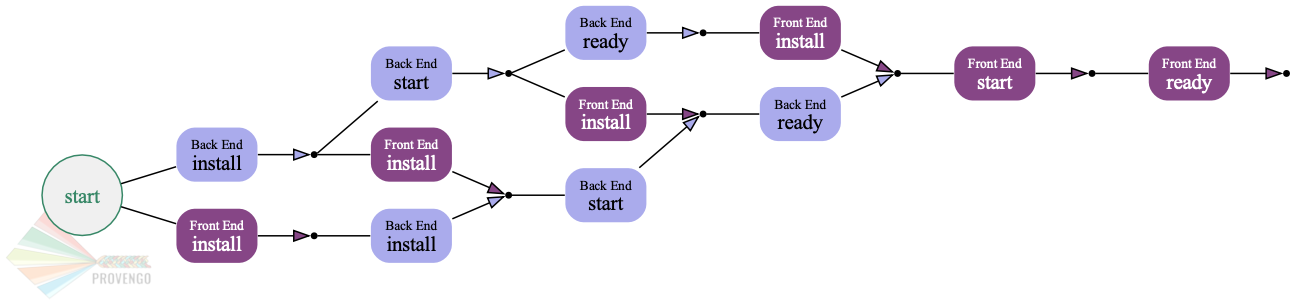
Since it makes no sense for the front end to be started until the back-end is ready, we can add the following constraint, that uses the events defined by the category (note the usage of «name»Event vs. do«Name»):
// don't start the front end until the back end is ready
Constraints.block( frontEnd.startEvent() )
           .until( backEnd.readyEvent() );
The resultant model looks like this:
Static Methods/Properties
These methods are invoked directly on the class, not on objects returned from EventCategory.create().
EventCategory.create(name, properties)
Creates a new event category object. This object can be used to generate and handle events of the category it represents. The name of the category should be unique - two event category objects created with the same name will represent the same category.
name-
String. The name of the event category.
properties-
Optional object. Customization for the category. Current fields are listed below, all are optional.
color-
String. HTML-like color notation (
#RRGGBB). This color is used for visualizations and manual test books. names-
String array. A list of event names that are part of the category. This list is used to generate convenience event methods in the created object. For each passed name - e.g.
"beep"- three methods will be generated.beepEvent()is the event representing a beep,doBeep()is a convenience method for requesting thebeepEvent(), andanyBeepis an event set containing allbeepEvent()s. Additionally, anamedEventsproperty, containing an array of event sets - one for each name - will be added to the returned event category object. See Auto-Generated Methods for more details. inlineRefinements-
Boolean, defaults to
false. Whentrue, refinement handlers (seerefine(name).with(handler)) run inline - inside the b-thread that requested the refined event usingdo()ordo«Name»()- rather than in a separate b-thread. This guarantees that the refinement completes before the requesting b-thread continues. See Inline Refinements for details.
Returns: An object for working with events from the created category.
Example
const carActions = EventCategory.create("Car Actions", { (1)
    color: "#88FF88",
    names: ["start","drive","turn","stop"]
});

bthread("car-main", function(){
    carActions.doStart();                  (2)
    carActions.doDrive();                  (3)
    carActions.doStop();
});

bthread("no double-start", function(){     (4)
    while ( true ) {
        waitFor(carActions.startEvent());  (5)
        sync({
            waitFor: carActions.stopEvent(),
            block: carActions.startEvent()
        });
    }
});-
Creating a new event category object, dealing with actions a car may take. The created category will have a light green color, and contain the pre-defined actions listed in the
namesarray. -
Using the auto-generated
do«Name»()methods to represent a simple scenario for driving a car. -
A bthread preventing the car from starting while already running.
-
Using the auto-generated
«name»Event()methods
EventCategory.any
An event set containing all the events from all event categories.
Example
// A bthread requesting a BEEP event after the first two event category events

bthread("2-beep", function(){
    waitFor( EventCategory.any );
    waitFor( EventCategory.any );
    sync({
        block: EventCategory.any,
        request: Event("BEEP")
    });
});
EventCategory.addTestBookStep(event, fmt)
This static method may be used during manual test book generation, to add event category events as test steps in the generated book. If the passed event is an event category event, this method adds a new step to the manual test book being generated, based on the passed event. It then returns true. Otherwise, the passed event is a non-event category event. This method does not add any step to the book, and returns false.
event-
Event. The event that might be added to the book.
fmt-
Optional String. The format to use for the generated book step. defaults to
html. Another option isqc-xls, which should be used when generating Excel-based test books.
Returns: true if a step was added, false otherwise.
Example
Below is an excerpt from a documentEvent function using EventCategory.addTestBookStep()
function documentEvent( event ) {
    ScenarioUtils.autoTag(event);
    if ( EventCategory.addTestBookStep(event) ) return; (1)
    // The event is not a member of an event category,
    // continue processing by other means
    ...
}| 1 | If the event was handled by the EventCategory.addTestBookStep, stops its processing (as the book has been updated with a matching step). Otherwise, continues as usual. |
EventCategory Object Methods
These methods are called on event category objects - that is, objects returned from EventCategory.create().
ec.event(name, value)
Creates an event that is a member of the object’s category.
name-
String. The name of the event.
value-
Optional. A value that will be available in
event.data.value.
Returns: A category event whose name is the passed name, and its data.value field holds the passed value.
Example
A famous nursery rhyme expressed in a bthread, using an event category.
const ec = EventCategory.create("Bobbin");
bthread("wind the bobbin up", function(){
    request( ec.event("wind", {direction:"up"}));
    request( ec.event("wind", {direction:"up"}));
    request( ec.event("pull") );
    request( ec.event("pull") );
    request( ec.event("clap") );
    request( ec.event("clap") );
    request( ec.event("clap") );
});
ec.do(name, value)
Requests a category event with the passed name and value. Refinements will be triggered after the event is selected (if defined).
name-
String. The name of the event.
value-
Optional. A value that will be available in
event.data.value.
Returns: The selected event.
Example
A famous nursery rhyme expressed in a bthread, using event category’s do method. Compare to the example for the event method.
const ec = EventCategory.create("Bobbin");
bthread("wind the bobbin up", function(){
    ec.do("wind", {direction:"up"});
    ec.do("wind", {direction:"up"});
    ec.do("pull");                  (1)
    request( ec.event("pull") );    (2)
    ec.do("clap");
    ec.do("clap");
    ec.do("clap");
});-
This line is equivalent to the line below it.
-
This line is equivalent to the line above it.
ec.any
An event set containing all events in this category.
Example
Using the any event set to block category events. Here in a sample test for a web site,
where the user b-thread navigates the site and the validate greeting b-thread validates
the greeting is correct at the proper time.
// Define event
const userActions = EventCategory.create("User");
const validations = EventCategory.create("Validations");
bthread("user", function(){
    userActions.do("login");
    requestOne([
        userActions.event("dashboard"), userActions.event("personal page"),
        userActions.event("feed"), userActions.event("orders"),
    ]);
    userActions.do("logout");
});
bthread("validate greeting", function(){
    waitFor(userActions.event("login"));
    block( userActions.any, function(){    (1)
        validations.do("Greeting Shown");
    });
});-
Using
userActions.anyto block any user actions while validating the previous user action result.
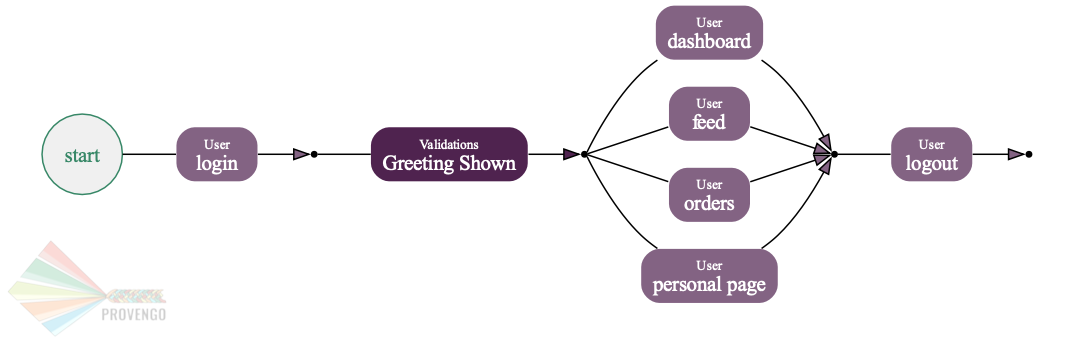
The resultant model is shown below. Note that after login, all four possible User category events are blocked until the greeting is validated.
ec.anyNamed(name)
An event set containing all events in the category whose name is name.
name-
The name of the events in the category.
Returns: An event set containing events from this category whose name is name.
Example
The code below checks that a robot moved after any move event. See also the example for refine().with().
const robot = EventCategory.create("robot");
bthread("robot", function(){
    requestOne([
        robot.event("move", {direction:"up"}),
        robot.event("move", {direction:"down"}),
        robot.event("move", {direction:"forward"}),
        robot.event("stay")
    ]);
});
bthread("location change check", function(){
    let moveEvent = waitFor( robot.anyNamed("move") );
    request( Event("validate robot moved " + moveEvent.data.value.direction));
});
ec.refine(name).with(handler)
Calls the passed handler whenever a category event with the passed name is selected. While handler executes, all events from this category are blocked.
This method provides an easy way of introducing "lower level"/"finer grain" scenarios into a model. A common use case is having an event category represent a business-level flow, and using refine() to create an automation layer by adding a series of automation-related events after each category event. See example.
By default, handler runs in a separate b-thread. Thus, the b-thread that requested the refined event may continue in parallel to handler, and its subsequent non-category events may be selected before handler completes. To have handler run as part of the requesting b-thread, create the category with inlineRefinements: true (see Inline Refinements).
handler should not request events from this category, as they are blocked while handler executes.
|
When the category was created with inlineRefinements: true, refinements must be registered during model setup (i.e., at the top level of a model file), and each event name may have only one refinement. In that case, calling refine(name).with(handler) or refineAny().with(handler) from within a b-thread, or registering a second refinement for the same name, is an error. See Inline Refinements.
|
name-
String. Name of events in the category for which
handlershould be invoked. handler-
Function. Accepts the selected event as a parameter.
Example
The code below checks that a robot moved after any move event.
const robot = EventCategory.create("robot");
bthread("robot", function(){
    requestOne([
        robot.event("move", {direction:"up"}),
        robot.event("move", {direction:"down"}),
        robot.event("move", {direction:"forward"}),
        robot.event("stay")
    ]);
});

robot.refine("move").with(function(e){
    request( Event("validate robot moved " + e.data.value.direction));
});
ec.refineAny().with(handler)
Same as refine(name).with(handler), but for any event in the event category. When the category was created with inlineRefinements: true, it must not be called from within a b-thread, and may be called only once. It may be combined with refine(name) refinements (see Inline Refinements).
handler-
Function. Accepts the selected event as a parameter.
Example
In the example below, refineAny().with() is used to follow any action the robot takes with an appropriate validation.
const robot = EventCategory.create("robot");
bthread("robot", function(){
    requestOne([
        robot.event("move", {direction:"up"}),
        robot.event("move", {direction:"down"}),
        robot.event("move", {direction:"forward"}),
        robot.event("stay")
    ]);
});

robot.refineAny().with(function(e){
    if ( String(e.name) === "move") {
        request( Event("validate robot moved " + e.data.value.direction));
    } else {
        request( Event(`validate robot did not move`));
    }
});
Inline Refinements
By default, refinement handlers (registered with refine(name).with(handler) or refineAny().with(handler)) run in a separate b-thread, that blocks all events of the category while the handler executes. Consider the following model:
const robot = EventCategory.create("robot");
bthread("robot", function(){
    robot.do("move", {direction:"up"});
    request( Event("a") );
    robot.do("move", {direction:"down"});
    robot.do("move", {direction:"right"});
});

robot.refine("move").with(function(e){
    request( Event("inner " + e.data.value.direction) );
});
Here, inner down always precedes move right, as the refinement blocks the robot’s events. However, a may be selected before inner up: once move up is selected, both the robot b-thread and the refinement b-thread continue, so a and inner up are requested at the same time.
When the refinement should be part of the requesting b-thread’s flow, create the category with inlineRefinements: true:
const robot = EventCategory.create("robot", {inlineRefinements: true});Now, after the event requested by do() (or do«Name»()) is selected, the matching refinement handlers are invoked by do() itself, in the calling b-thread, while blocking all events of the category. That is, do() returns only after the refinement is done. For the model above, this means that:
-
inner upis always selected beforea, sinceais requested by the same b-thread, afterdo()returns. -
Events of the
robotcategory requested by other b-threads cannot be selected betweenmove upandinner up. -
Events that are not in the
robotcategory, and are requested by other b-threads, may still be selected betweenmove upandinner up.
An inline category allows at most one refine(name) refinement for each event name, and at most one refineAny() refinement. Registering a second one is an error. refineAny() and refine(name) may be combined: when both match the selected event, both handlers are invoked one after the other, in the order in which they were registered, and other category events are blocked until both are done. Inline refinements must also be registered during model setup - calling refine() or refineAny() from within a b-thread is an error.
In inline mode, refinements are invoked only for events requested by the category’s do() and do«Name»() methods. Category events requested by other means - e.g. request( robot.event("move") ) or requestOne([…]) - are not refined.
|
Auto-Generated Methods
In many cases, the names of the events in a category are known in advance. The Event Category library makes usage easier in these cases, by auto-generating methods and event sets. To use this mechanism, pass the names of the known event to EventCategory.create.
In the example below, a robot starts up, performs a single action, and turns off. As the actions are known in advance, we can create an event category that contains them, and enjoy the auto generated methods.
const robot = EventCategory.create("robot", {
    names: ["start", "move", "stay", "off"]    (1)
});
bthread("robot", function(){
    robot.doStart();  (2)
    requestOne([
        robot.moveEvent({direction:"up"}),  (3)
        robot.moveEvent({direction:"down"}),
        robot.moveEvent({direction:"forward"}),
        robot.stayEvent()   (4)
    ]);
    robot.doOff();
});

bthread("move tracker", function(){
    let move = waitFor( robot.anyMove );  (5)
    request( Event("validate robot moved " + move.data.value.direction));
});-
Creating an event category for robot actions, with a known action list.
-
Using the auto-generated
doStart()method, which requests a robot start event (similar torobot.do("start")); -
Using the
moveEvent(). The passed parameter will be available in the generated event’sdata.valuefield. -
Using the
stayEvent()auto-generated method. Used here with no parameters. -
Using the auto-generated event set
anyMove, which contains all robot’smoveevents.
|
Human Readable Event Names
The Event Category library supports human readable names, such as |
ec.«name»Event(aValue)
An event from the ec category, containing the value aValue.
Example
Using the generated nameEvent method for blocking actions when its battery is low. Equivalent of ec.event(«name», aValue).
Here, we assume that the move event does not use parameters. See the example for any«Name» below for dealing with cases with parameters.
const robot = EventCategory.create("robot", {
    names: ["start", "move", "stay", "off", "batteryLow", "batteryOk"]    (1)
});
bthread("Do not move when is battery low", function(){
    while ( true ) {
        waitFor(robot.batteryLowEvent());
        sync({
            block: robot.moveEvent(),
            waitFor: robot.batteryOkEvent()
        });
    }
});
ec.do«Name»(aValue)
Request an event with «name» and aValue. Equivalent of request(ec.event(«name», aValue))
Example
A robot performing a short travel using the ec.do«Name»() calls.
const robot = EventCategory.create("robot", {
    names: ["start", "move", "stay", "off"]    (1)
});
bthread("Do not move when is battery low", function(){
    robot.doStart();
    robot.doMove({direction:"left"});
    robot.doMove({direction:"right", distance:300});
    robot.doMove({direction:"forward", speed:33});
    robot.doStay({duration:1000});
    robot.doOff();
});
ec.any«Name»
An event set containing all events from the category whose name is «name». Equivalent to ec.anyNamed(«name»).
Example
Using the generated any«Name» for blocking robot movements when its battery is low.
const robot = EventCategory.create("robot", {
    names: ["start", "move", "stay", "off", "batteryLow", "batteryOk"]    (1)
});
bthread("Do not move when is battery low", function(){
    while ( true ) {
        waitFor(robot.batteryLowEvent());
        sync({
            block: robot.anyMove,
            waitFor: robot.batteryOkEvent()
        });
    }
});
ec.namedEvents
Contains an array of event sets, one for each passed name. This creates an easy way for defining coverage goals for a given category.
Example
Given a model containing event categories for a rover and a quadcopter, we can generate full action coverage using the following code and the ensemble subcommand.
const rover = EventCategory.create("Rover", {
    names: ["on", "forward", "backward", "left", "right", "stop", "off"]
});
const quadcopter = EventCategory.create("Quadcopter", {
    names: ["up","down","left","right","land"]
});

// Typically, the line below will be in meta-spec/ensemble.js:
const GOALS = rover.namedEvents.concat(quadcopter.namedEvents);